CHC Individual Registration
Credit Union Cherry Blossom 10 Mile & 5K Capitol Hill Competition
Individual Race Registration
Important: If you plan to run as part of a Capitol Hill Team, before you start the registration process, ask your Team Captain if they have created the team and what the team name is.
CHC Race Registration Form
Before you click the button further down the page to register, we suggest you look at the instructions below for a quick explanation of how the process works.
Step 1: Once you click the link to access the Capitol Hill Registration at the bottom of this page, you will need to sign in to your Race Roster account (or create one if you don’t have a Race Roster account). Once you are into your account, you will see 4 options (see screenshot below). Skip the first option - that is for Team Captains who want to create a Team (if you do want to create a team, you are in the wrong place - CLICK HERE for Team Registration). The last three options are the individual race registration options - 10 Mile, 5K and Double Blossom. Choose which race you wish to enter.
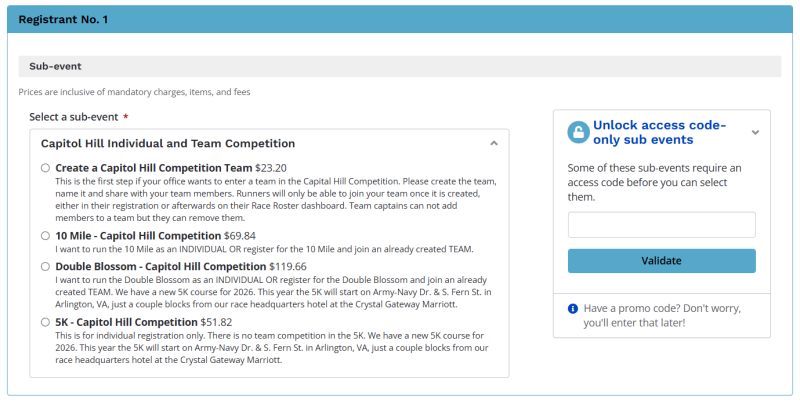
Step 2: Scroll down to start filling out the Race Registration form.
Step 3: If you plan to run as part of a Capitol Hill team in the 10 Mile, you can select the Team you wish to join from a dropdown during the registration process, as long as your Team Captain has already created the team (if your Team Captain has not yet created the team, tell them to do so). Make sure you know the name of the team you want to join! Click on the option Yes add to an existing team and then select your team from the dropdown. Team captains will be asked if they want to join a team that they have created.
Step 4: If you register for the race and your Team Captain has not yet created the team, you will be able to join the Team once it is created from your Race Roster dashboard. Log into the dashboard (https://raceroster.com/dashboard/participants/107204) and you will see your 10 Mile or Double Blossom Registration. In the middle of the registration there will be a box labeled Team and you will see a button in it that says “Join Team.” (see screenshot below). Click on that button and you will be able to pick your team from a dropdown. There is no CHC Team Competition in the 5K.
Step 4: If you register for the race and your Team Captain has not yet created the team, you will be able to join the Team once it is created from your Race Roster dashboard. Log into the dashboard (https://raceroster.com/dashboard/participants/107204) and you will see your 10 Mile or Double Blossom Registration. In the middle of the registration there will be a box labeled Team and you will see a button in it that says “Join Team.” (see screenshot below). Click on that button and you will be able to pick your team from a dropdown. There is no CHC Team Competition in the 5K.
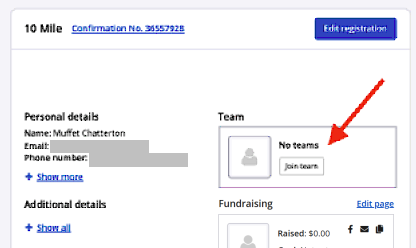
Step 5: If you find you need to remove yourself from the team, you will need to notify your Team Captain. Only Team Captains can remove Team Members.
Questions?
If you have any questions regarding the Capitol Hill Competition, please contact Sarah Turner at chc@cherryblossom.org.
For questions regarding the Capitol Hill Competition registration process, please contact Shannon Ross at info@cherryblossom.org.