CHC Team Registration
Credit Union Cherry Blossom 10 Mile & 5K Capitol Hill Competition
IMPORTANT NOTE: Following the instructions on this page will create your TEAM. If you want to run on that team, after you create your team using the link below, you MUST go to the INDIVIDUAL REGISTRATION HERE, fill out the registration form for either the 10 Mile or Double Blossom, and affiliate with the team you created on that form. It is a two-step process!!
Team Registration
Team competition in the 10 Mile will be held in three categories: House teams, Senate teams and Capitol Hill Agency teams. Click Here for complete team rules. Any Team Captain who creates a team will be charged a $20 Team Fee (plus a service fee). Individuals who join the team after it is created are not charged a fee to join the team; they pay only their individual registration fee.
CHC Race Registration Form
Before you click the link further down the page to create your team(s), we suggest you look at the instructions below so that you will understand how the process works. Note that there is no team competition in the 5K; the team competition is in the 10 Mile. Double Blossom entrants (runners who run the 5K on Saturday and the 10 Mile on Sunday) can run as part of a 10 Mile team.
Step 1: Once you click the link to access the Capitol Hill Registration at the bottom of this page, you will need to sign in to your Race Roster account (or create one if you don’t have a Race Roster account). Once you are into your account, you will see 4 options (see screenshot below). You want to select the first option, Create a Capitol Hill Competition Team.
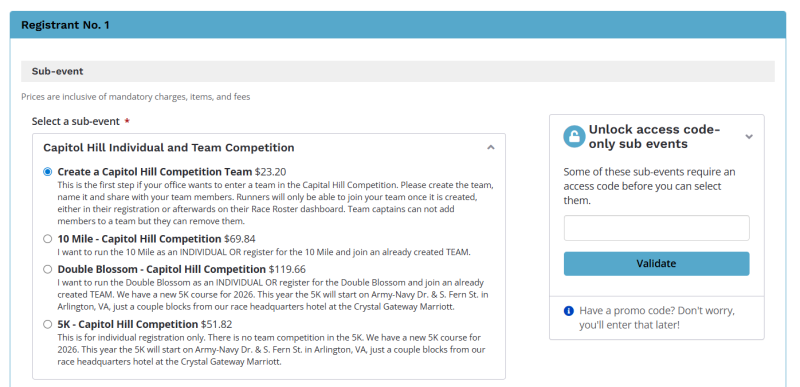
Step 2: Once you select the Create a Team option, the team registration form will appear below the options box; just scroll down and fill out the form.
Step 3: In the Teams section of the form, click the + sign next to "Create new team" to add your team.
A $20 Team Fee (plus a processing fee) will be added to your registration fee (this is the only team fee charged; other team members will not be charged a team fee when they join your team). Make sure to tell your team members the name of the team so that they can select it when they fill out their own individual registrations.
Team Captains Who Want to Create Multiple Teams
Team Captains are allowed to create more than one team; just Click Here to go through the process again.
Important Notes:
- Captains cannot add members to teams through their dashboards. Runners must join the team either when they register, or they can join from their individual Race Roster dashboard if they have already registered by logging into their Race Roster account dashboard (https://raceroster.com/dashboard/participants/107204) where they will see their Registration. In the middle of the registration there will be a box labeled Team and there will be a button in it that says “Join Team”. Click on that button and they will be able to pick your team from a dropdown.
- Captains can remove members from teams.
Want to Register Yourself for the Race?
Once you have created all the teams you wish, if you want to run the race yourself, Click Here for instructions on individual registration. When you get to the Teams section of the registration form, you will be asked if you want to join any of the teams you have created. Click the team you wish to join. You will be able to remove yourself or change teams but you must be registered as an individual and pay the entry fee for either the 10 Mile or Double Blossom if you wish to run on a CHC team.
Want to Manage Your Team(s)?
If you want to see who has signed up for your team(s) or if you need to remove member(s) from a team, follow these steps:
Access Your Dashboard by going to https://raceroster.com/dashboard/participants/107204 - this page will list all of your registrations
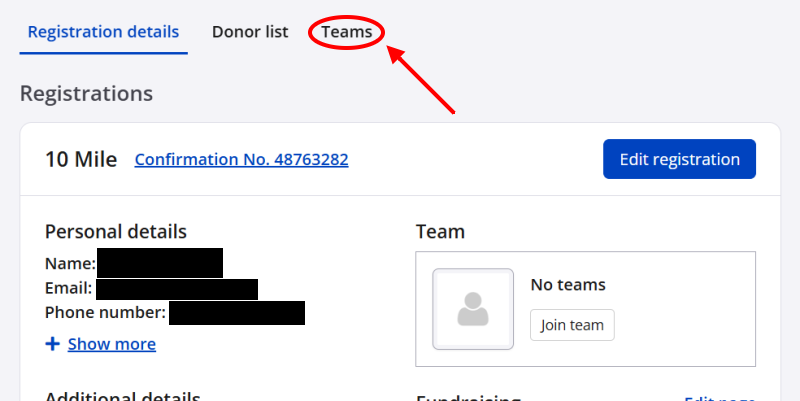
At the top of this page you will see the word Teams (see screenshot below). Click on Teams and you will get a list of all teams you have created and the members of each team. The Team Captain will be listed for every team you create.
There is a Remove button for each team member; click the Remove button for any team member you wish to remove. Team members cannot remove themselves - only Team Captains can remove a team member.
Questions?
For questions regarding the Capitol Hill Competition Registration Process, please contact info@cherryblossom.org.
If you have any questions regarding the Capitol Hill Competition, please contact Sarah Turner at chc@cherryblossom.org.